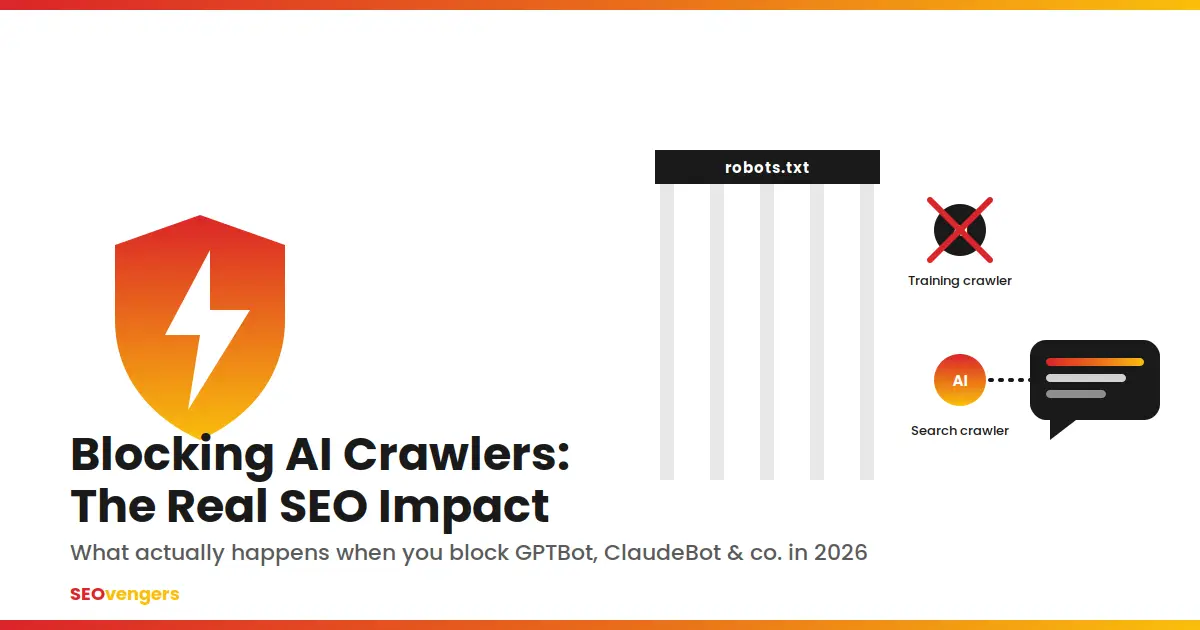
Because ~95% of them only blocked the training bot, not the one that controls citations.TL;DR
Blocking “AI crawlers” isn’t one decision. OpenAI, Anthropic, and Perplexity each run separate bots for training, live search citations, and user-triggered fetches, and blocking one doesn’t block the others.
Training crawlers like GPTBot and ClaudeBot have almost no effect on today’s Google rankings or today’s AI citations. Blocking them costs you very little right now.
Search/retrieval crawlers like OAI-SearchBot are the actual control point for AI visibility. Block those, and you drop out of ChatGPT, Claude, and Perplexity answers.
A large share of sites that believe they’ve blocked AI still get cited anyway, usually because only the training bot was blocked, or the citation is coming from a mention on someone else’s page.
AI referral traffic is still a small slice of total visits, but it converts several times higher than plain organic search, so this is a revenue decision, not just a technical one.
What “Blocking AI Crawlers” Actually Means
Most conversations about blocking AI still treat it like a single switch. It isn’t. OpenAI alone operates three separate, independently controlled bots, and Anthropic and Perplexity mirror the same structure. A blanket “block all AI” rule in robots.txt, or a CDN firewall setting flipped in a hurry, usually catches all three at once, which is rarely what the site owner actually wants.
The three jobs an AI crawler can do
Training crawlers gather pages that may shape a future model’s weights. GPTBot, ClaudeBot, Google-Extended, Bytespider, and CCBot sit in this bucket. None of them power what a chatbot tells a user today; they influence what a future version of the model might “know” months from now.
Search and retrieval crawlers build the index a chatbot’s search feature actually pulls from when it answers a live question. OAI-SearchBot, Claude-SearchBot, and PerplexityBot do this job, and this is the bot that determines whether a brand shows up in an answer today, not months from now.
User-triggered fetchers, like ChatGPT-User, Claude-User, and Perplexity-User, only fire when a person explicitly asks the assistant to open a specific page. OpenAI’s own documentation notes that robots.txt rules may not reliably apply to this category at all, since a human, not a schedule, initiated the request.
The crawlers to know in 2026
Crawler
Operator
Job
Blocking it affects
GPTBot
OpenAI
Training
Future model training only
OAI-SearchBot
OpenAI
Search / retrieval
ChatGPT search answers, today
ChatGPT-User
OpenAI
User-triggered fetch
One-off reads a user requests
ClaudeBot
Anthropic
Training
Future model training only
Claude-SearchBot
Anthropic
Search / retrieval
Claude’s live citations
Claude-User
Anthropic
User-triggered fetch
One-off reads a user requests
PerplexityBot
Perplexity
Search / retrieval
Perplexity’s live citations
Google-Extended
Google
Training (Gemini)
Gemini training only, not Search or AI Overviews
Bytespider / CCBot
ByteDance / Common Crawl
Training
Downstream models trained on the corpus
GPTBot and ClaudeBot handle training. OAI-SearchBot and PerplexityBot handle live citations. ChatGPT-User handles one-off page reads.
Treating all of these as one “AI bot” decision is where most misconfigurations start. A robots.txt file written in 2022 or 2023, before most of the search-specific tokens existed, is very likely blocking or allowing the wrong thing without anyone realizing it.
What Actually Changes When You Block Them
This is where a lot of the anxiety around “blocking AI” is misplaced. Blocking a training crawler like GPTBot or ClaudeBot has no bearing on Google or Bing rankings, because those run on entirely separate crawler systems, Googlebot and Bingbot, with their own schedules and their own indexes. Blocking a training crawler also has close to no effect on whether ChatGPT or Claude cite a brand today, because training and live retrieval are handled by different bots with independently configurable robots.txt rules, something OpenAI states directly in its own crawler documentation: a webmaster can allow OAI-SearchBot to stay visible in search results while disallowing GPTBot to opt out of training, and the two settings don’t interact.
What blocking does change is narrower than “AI visibility” as a blanket concept. Block a search/retrieval bot like OAI-SearchBot, and the consequence is direct: content stops appearing in ChatGPT’s search answers, though it may still surface as a bare, unenriched navigational link. That’s the actual lever. Everything else is closer to a training-data opt-out than a visibility switch, and treating the two as the same decision is how well-intentioned teams end up either giving away more than they meant to, or losing visibility they never meant to lose.
Why Blocked Sites Still Show Up in ChatGPT Answers
This is the part that trips people up, and it mirrors an anomaly a well-known SEO consultant flagged recently on LinkedIn: a site configured to block every OpenAI crawler was still turning up, heavily, in ChatGPT’s answers to brand-related questions. That isn’t a bug. A handful of mechanisms explain most cases like it:
The block was applied to GPTBot only, not to OAI-SearchBot, which is a common and, per OpenAI’s own documentation, entirely valid configuration: allow search, block training.
The citation is coming from a mention of the brand on a page the model can access, a review site, a news writeup, a forum thread, rather than from the blocked page itself.
The model is drawing on what it already absorbed during training, before the block was ever put in place. Retroactively blocking a crawler doesn’t erase what’s already baked into a model’s weights.
Search-index metadata, titles, snippets, and structured data that a general web index already holds, can get pieced together with other retrieved sources even when the underlying page was never fetched directly by that specific assistant.
The scale of this isn’t anecdotal. Search Engine Journal reported in April 2026 that roughly three-quarters of sites blocking OpenAI’s or Google’s AI bots still turned up in AI citations, and that about 95% of those cited-but-blocked pages had only blocked the training bots, not the search bots. A separate study cross-referencing robots.txt rules against citation data across more than a thousand highly-visible domains found the mirror-image failure mode: sites that block a provider’s own search/retrieval bot see citation rates from that specific provider collapse toward zero, while blocking an unrelated provider’s bot barely moves the needle on the others.
The practical read either way is the same: whether a brand shows up in AI answers is mostly not a matter of “did we block AI.” It’s a matter of which specific bot got blocked, and whether the information circulating about the brand elsewhere on the web is accurate, since that’s what fills the gap whenever the origin page itself is unreachable.
The Cloudflare Default-Block Problem
A meaningful share of “we blocked AI on purpose” cases are actually “we didn’t realize Cloudflare blocked AI for us.” Cloudflare became the first major infrastructure provider to block AI crawlers by default, and independent testing has confirmed that brand-new domains onboard with AI bot blocking already switched on, before the site owner has touched a single setting.
The policy kept evolving through 2026. Since July 1, Cloudflare has managed AI crawler access across three separate categories, Search, Agent, and Training, replacing the old blanket “block AI bots” toggle. From September 15, 2026, Cloudflare evaluates any crawler that serves more than one purpose, and it names Googlebot specifically as an example, under whichever applicable rule is the most restrictive. In practice, that means a training-only block set casually months earlier can start catching Googlebot, Applebot, and Bingbot too, an outcome almost nobody actually intends. Anyone running a technical audit this year has a genuine reason to check the security settings for AI crawler rules that were switched on by default rather than chosen deliberately, since even among prominent domains, most robots.txt files still don’t explicitly address the newer search-specific tokens at all, which usually means the CDN layer, not the robots.txt file, is quietly making the decision instead.
Not All Crawlability Equals Citation: The Wider GEO Picture
Being reachable by the right bot is necessary, but it isn’t sufficient on its own. The Princeton-led GEO (Generative Engine Optimization) study, the first large-scale academic look at what actually improves AI citation rates, tested nine content interventions across thousands of queries. The three that moved the needle most were adding specific statistics, adding attributable quotations, and citing outside sources within the content itself, each worth roughly a 30 to 40 percent lift in citation likelihood. Keyword stuffing, by contrast, produced no benefit and a slight penalty on at least one engine tested.
Two findings from more recent 2026 research are worth knowing precisely because they cut against common assumptions. First, schema markup on its own showed no measurable uplift in citation rates on AI Overviews, AI Mode, or ChatGPT in a mid-2026 Ahrefs analysis, despite widespread advice treating it as a prerequisite. Second, an audit of a million-plus AI citations found that roughly seven in ten cited sites had at least one technical barrier, a robots rule, a CDN challenge, or content hidden behind client-side JavaScript, quietly limiting how much of their site an AI crawler could actually see. Crawler policy is the access layer. Content quality, structure, and accurate third-party mentions are what convert that access into an actual citation.
Why This Actually Matters for Convertible Traffic and Brand Presence
Visibility in AI answers isn’t a vanity metric. The traffic that does arrive from AI platforms converts meaningfully better than plain organic search, across every study published so far. Semrush’s 2026 cross-industry dataset puts AI-driven visitors at roughly 4.4 times the conversion rate of standard organic traffic. Ahrefs found an even starker gap in its own numbers: AI search made up just half a percent of its total traffic, yet drove over 12% of signups, more than a twentyfold conversion advantage. Adobe’s retail data shows a similar pattern, with AI-referred shoppers converting noticeably better and spending more time on product pages than non-AI visitors, and Shopify’s merchant data points the same direction for ecommerce specifically.
The volume is still small, typically somewhere around one to six percent of total traffic depending on the study and the industry, but it’s growing fast, and the visitors who do arrive tend to have already done their research through the assistant before they ever click through, which is part of why they convert at the rate they do. That combination, small in volume but high in intent and conversion value, is exactly why blocking the wrong crawler is a business decision with a revenue line attached to it, not a technical footnote to leave entirely to the dev team. It’s also worth noting that most analytics setups still misattribute this traffic as “direct” rather than tracking it as its own channel, so a brand can be losing or gaining AI referral traffic without anyone on the marketing side noticing the shift in the reporting.
Choosing an AI Crawler Policy by Business Type
There’s no single correct answer for every business, and the right call depends heavily on what the content actually is and who benefits if a model can read it for free.
Business type
Typical call
Why
SaaS or service brand chasing visibility
Block training, allow search and user-fetch
The goal is to be cited and clicked, not just memorized for free
Publisher, paywalled or ad-supported
Block broadly, or explore pay-per-crawl
Training bots consume the asset without paying the publisher for it
Ecommerce
Block training, allow search and user-fetch
AI-referred orders carry a documented conversion and order-value premium
Proprietary or licensed data holders
Block broadly by default
The downside of leakage outweighs the citation upside
Local / multi-location service business
Block training, allow search
Accuracy of official branded information matters even where volume is modest
A SaaS brand and a paywalled newsroom can reasonably land on opposite policies for the exact same crawler, and both would be correct given what each one is protecting.
A Practical robots.txt Baseline for 2026
For a business that wants AI citation eligibility without handing over free training data, the widely used middle-ground configuration looks roughly like this:
This keeps the training bots out while leaving the door open for search and user-triggered access, the two categories that actually put a brand in front of someone asking a question. Search-related changes typically show up in AI search behavior within about 24 hours; training-related changes can take considerably longer to be reflected, since that runs on a slower, separate update cycle.
It’s also worth treating llms.txt, the emerging file some sites publish alongside robots.txt to describe their content to AI systems, as a supplementary signal rather than an enforceable control. No major AI provider has committed to treating it as binding the way robots.txt is generally respected, so it’s a “nice to have” clarity layer, not a substitute for getting the crawler-specific robots.txt rules right.
Auditing Whether You’re Blocked by Accident
A short checklist covers most of what actually goes wrong in practice:
Pull the live robots.txt and check the rule for each named crawler individually, not just a generic “AI” line that may not exist at all.
Check the CDN or WAF, Cloudflare in particular, for AI bot rules that may have been switched on automatically rather than chosen deliberately.
Request a key page using a crawler-identifying user agent and confirm it returns a normal response rather than a challenge or block page.
Check server logs for GPTBot, OAI-SearchBot, ClaudeBot, Claude-SearchBot, and PerplexityBot activity to see who is actually reaching the site right now.
Track whether the brand is being cited in AI answers at all, and if it is, whether the citation actually points back to the site itself or to a third party talking about the brand instead.
Doing this once a quarter is enough for most businesses; the crawler landscape and the CDN defaults around it have both changed enough in the past year that a robots.txt file left untouched since last year is genuinely likely to be out of date.
Which Industries This Applies To
This decision touches almost anyone running organic or paid marketing, but it bites hardest for a specific set of businesses:
SaaS and B2B software brands, where buyers increasingly research vendors through an assistant before ever visiting a website directly.
Ecommerce and DTC brands, where AI-referred orders already show a measurable conversion and average-order-value premium over plain organic traffic.
Local and multi-location service businesses, where accuracy of “official” branded information in an AI answer matters even while referral volume is still modest.
Publishers and content sites weighing content-licensing revenue, such as pay-per-crawl arrangements, against citation-driven referral traffic.
Agencies and in-house SEO or marketing teams running technical audits, since a single misconfigured CDN rule can quietly undo months of content and content-strategy work.
FAQ
Does blocking GPTBot hurt my Google rankings?
No. GPTBot and Googlebot are entirely separate crawler systems run by different companies, and blocking one has no direct bearing on the other, unless a broad wildcard rule accidentally catches both at once.
What is the actual SEO impact of blocking AI crawlers?
Blocking a training crawler like GPTBot or ClaudeBot has close to no immediate impact on either Google rankings or today’s AI citations. Blocking a search or retrieval crawler like OAI-SearchBot is the move that actually removes a brand from AI-generated answers.
Why does my site still get cited in ChatGPT if I blocked GPTBot?
Because GPTBot only controls training. Citations come from OAI-SearchBot, the search bot, and ChatGPT-User, the live-fetch bot, both independent settings, plus third-party mentions the model can still read even when the brand’s own page is blocked.
Should ecommerce sites block AI crawlers?
Most ecommerce brands are better off blocking only the training bots, since AI-referred orders have shown a documented conversion and order-value premium over plain organic search across multiple 2026 studies.
Does Cloudflare block AI crawlers automatically?
Yes, on new domains Cloudflare has enabled AI bot blocking by default, and its 2026 policy groups crawlers into Search, Agent, and Training categories, with multi-purpose crawlers like Googlebot evaluated under whichever rule is most restrictive starting September 2026.
How long does it take for a robots.txt change to affect AI search visibility?
Search-related changes typically show up within about 24 hours. Training-related changes can take considerably longer to be reflected, since that runs on a separate, slower model-update cycle.
Final Thoughts
The honest version of this topic is less dramatic than “block AI and lose everything,” and less safe than “block AI and lose nothing.” It’s a bot-by-bot decision, and the businesses getting it right in 2026 are the ones auditing their actual robots.txt file and CDN settings rather than assuming a blanket rule did what they meant it to do. Given what a single AI-referred conversion is already worth relative to a plain organic one, that audit is worth an afternoon of anyone’s time this quarter, not a someday item on a backlog.
Get your free AI crawler and technical SEO audit
Most content fails because of strategy, not writing. Here is the systematic, 2026-ready framework SEOvengers uses to turn scattered blog posts into a search-dominating topical authority engine.
Most businesses approach content marketing backwards. They publish one post, it doesn't rank, and they conclude that "content marketing doesn't work." The real problem is almost never the writing — it's the absence of a topical strategy. In 2026, with Google's Helpful Content signals and AI-generated search results rewarding genuine expertise, the sites that win are the ones that own an entire topic, not the ones that chase isolated keywords.
This guide breaks down exactly how to build topical authority step by step — the same architecture we deploy for clients across technical SEO, local SEO, and e-commerce SEO.
What you'll learn
What topical authority is and why it beats random backlinks in 2026
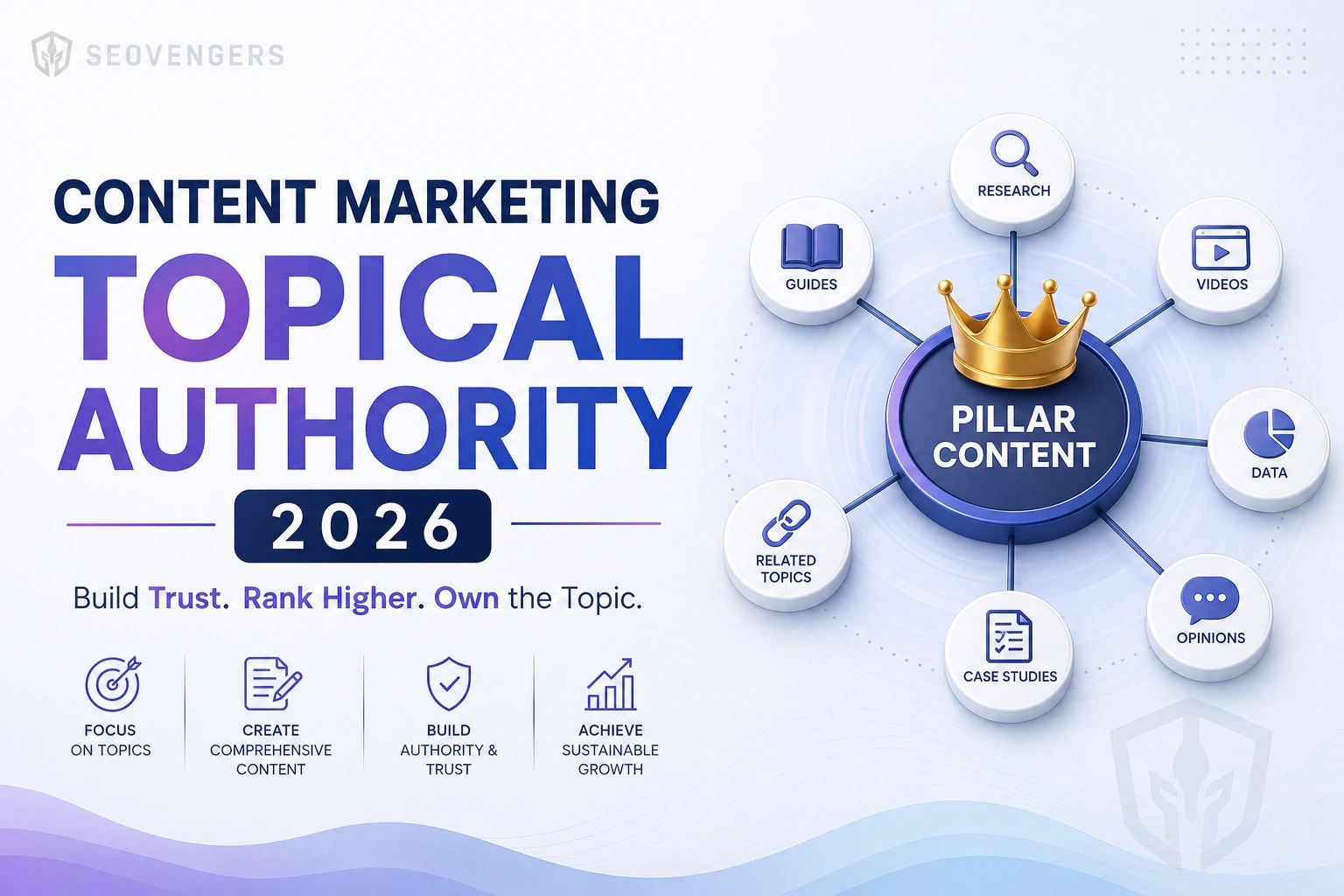
The pillar-and-cluster model, visualized
A repeatable 5-step framework to build authority on any topic
A strategic internal linking architecture you can copy
A 90-day roadmap and the metrics that prove it's working
What Is Topical Authority?
Topical authority is how confident a search engine is that your site is a genuine expert on a subject. A site that covers one topic comprehensively — answering every related question a user could have — consistently outranks a site with thin content scattered across dozens of unrelated topics, even when the comprehensive site has fewer backlinks.
Google doesn't rank pages in isolation anymore; it evaluates the topical context of your whole domain. This is reinforced by E-E-A-T (Experience, Expertise, Authoritativeness, Trust) and the Helpful Content System, both of which reward depth, first-hand experience, and content that fully satisfies intent. The mechanism for demonstrating that depth is the pillar-and-cluster (hub-and-spoke) model.
The hub-and-spoke model: one comprehensive pillar page supported by interlinked cluster articles.
Why Topical Authority Beats Random Backlinks
Backlinks still matter — but they amplify authority you've already built; they don't replace it. A handful of deep, interconnected articles signals expertise that a pile of disconnected posts never will. Topical authority is more durable, compounds over time, and is far harder for competitors to copy than a backlink profile. Pair both and you become almost impossible to dislodge.
Step 1: Define Your Core Topics (Pillars)
Identify 3-5 core topics directly tied to your business and revenue. Each becomes a pillar: a comprehensive guide targeting a high-volume head term. Resist the urge to cover everything — depth beats breadth.
For each pillar, brainstorm 8-15 subtopics that become cluster articles. Every cluster targets one specific long-tail keyword and answers a single, focused question. The rule: each cluster links up to its pillar, and the pillar links down to every cluster. That interlinking is what signals topical depth.
Pro tip: Build your cluster map from real search data — autocomplete, "People Also Ask", and competitor gaps — not from guesses. Group keywords by the question they answer, not by surface-level wording.
Step 3: Match Search Intent
A perfectly written article ranks for nothing if it answers the wrong intent. Before writing, classify the query and match the format to what the searcher actually wants:
Search intent
What the user wants
Best content format
Informational
To learn or understand
Guides, how-tos, explainers, pillar pages
Commercial
To compare options before deciding
Comparisons, "best of" lists, case studies
Transactional
To take action / buy now
Service pages, product pages, demos
Navigational
To reach a specific brand or page
Branded landing pages, About, Contact
Step 4: Write for Comprehensiveness (and E-E-A-T)
Comprehensive doesn't mean longer for the sake of word count — it means fully resolving the topic so the reader never needs another tab. Cover the obvious questions and the follow-ups. Add first-hand experience, original data, examples, and visuals. Demonstrate the "Experience" in E-E-A-T that purely AI-spun content can't fake. This is exactly why depth-led content now outperforms volume-led content.
Step 5: Build a Strategic Internal Linking Architecture
Internal links are the connective tissue of topical authority. They pass relevance and link equity, help search engines discover and contextualize pages, and prove your coverage is interconnected rather than accidental. Done right, internal linking is the single highest-leverage SEO task most sites neglect.
How this very guide links: the Content Marketing pillar connects two-way to our core SEO guides, services, and proof.
The internal linking rules we follow
Pillar ↔ cluster, both ways. The pillar links to every cluster; each cluster links back to the pillar and to 2-3 sibling clusters.
Use descriptive anchor text. Link with the target's keyword (e.g., our technical SEO checklist), never "click here".
Link from strength to need. Point links from established pages toward newer pages that need authority.
Connect to money pages. Where relevant, route readers to services and proof like our client case study.
How to Measure Topical Authority
Share of keywords ranking within a topic cluster (rising = authority building)
Average position across the cluster, not just the pillar
Impressions & clicks for the topic in Google Search Console
Internal links per page and orphan-page count (should trend to zero)
"Also ranks for" growth — one strong page pulling in dozens of related queries
Your 90-Day Topical Authority Roadmap
Days 1-30 · Foundation
Map & publish the pillar
Choose one core topic, research the full cluster, and publish the comprehensive pillar page plus 2-3 clusters.
Days 31-60 · Depth
Fill the cluster
Publish the remaining clusters on a steady cadence, matching intent and interlinking every new piece up to the pillar.
Days 61-90 · Compound
Interlink, refresh & measure
Tighten internal links, refresh early posts, earn a few relevant backlinks, and track cluster-level rankings in GSC.
Common Mistakes to Avoid
Chasing unrelated keywords that dilute your topical focus
Publishing thin "clusters" that don't fully answer their question
Building a pillar but never interlinking the clusters back to it
Ignoring search intent and forcing a blog post where a service page belongs
Abandoning the topic after a month — authority compounds, it doesn't sprint
Frequently Asked Questions
What is topical authority in SEO?
It's the degree to which search engines trust your site as a comprehensive expert on a subject — earned through deep, interconnected pillar and cluster content rather than scattered one-off posts.
How long does it take to build topical authority?
Expect early movement in 60-90 days as clusters get indexed and interlinked, with authority compounding meaningfully over 4-8 months of consistent publishing.
Is topical authority more important than backlinks?
They work together, but in 2026 deep topical coverage with strong internal linking can outrank a bigger backlink profile attached to shallow content.
How many articles do I need for a topic cluster?
Typically one pillar page plus 8-15 cluster articles, each targeting a specific long-tail keyword and linking back to the pillar.
How do internal links build topical authority?
They pass relevance and equity between related pages and prove the depth and structure of your coverage — a pillar linking to every cluster (and back) is the strongest depth signal.
E-commerce brands in India lose millions because product pages never rank. SEO fixes that permanently.
1. Category Architecture First
Each category page must target a clear keyword cluster. Use descriptive URLs like /shoes/running-shoes-men/ not /category/123/. Structure mirrors search intent, not your inventory system.
2. Optimise Category Pages
Category pages rank for high-volume head terms. Every one needs a unique H1, 150-300 words of unique content, internal links to subcategories, and BreadcrumbList schema.
3. Handle Faceted Navigation
Use noindex on filtered URLs that do not target unique keywords. Use canonical tags pointing filtered pages to the main category URL to consolidate ranking signals.
4. Write Unique Product Descriptions
Copy-pasted manufacturer descriptions put you in competition with every other reseller. Write unique, benefit-focused descriptions with target keywords included naturally and common questions answered.
5. Implement Product Schema
Product schema enables rich results in Google: price, availability, star ratings. Add Product schema, AggregateRating schema, and BreadcrumbList schema on every product page.
6. Fix Site Speed
A 1-second delay reduces conversions by 7%. Serve images in WebP, use Cloudflare CDN, lazy-load product images, and remove render-blocking scripts from product pages.
7. Internal Link Blog to Products
A guide like Best Running Shoes for Flat Feet should link directly to your flat-feet category with keyword-rich anchor text. This passes link equity from informational to transactional pages.
When someone in India searches for an SEO agency in Hyderabad or a dentist near me, Google shows a Map Pack at the top of results. Getting into that box is the goal of local SEO.
Step 1: Claim and Optimise Your Google Business Profile
Your Google Business Profile is the single most important local SEO asset you have. Claim it at business.google.com. Fill out every field: business name exactly as it appears in the real world, primary category chosen carefully, a 750-character description using your target keywords, accurate hours, and photos. Businesses with 100+ photos get significantly more calls and direction requests.
Step 2: Build Local Citations (NAP Consistency)
Your business Name, Address, and Phone number must be identical across every directory: Justdial, Sulekha, IndiaMart, Yellow Pages, and your website. Even a small difference like Pvt. Ltd. vs Private Limited confuses Google and weakens your local authority. Audit and fix every inconsistency you find.
Step 3: Generate a Steady Stream of Google Reviews
Reviews are a major local ranking factor. The number, recency, and average rating all matter. Build a system: create a short review link from your GBP dashboard, ask every satisfied customer immediately after service by SMS, and respond to every review within 24 hours. Aim for at least 2 to 4 new reviews per month.
Step 4: Create Location-Specific Landing Pages
If you serve multiple cities or areas, create a dedicated page for each. A page titled SEO Services in Hyderabad with localised content will outrank a generic services page every time. Include the city name in your H1, URL, and meta title, plus local testimonials, a Google Maps embed, and LocalBusiness schema markup.
Step 5: Earn Local Backlinks
Links from local Indian news sites, trade associations, business directories, and partner websites signal to Google that you are a trusted local entity. Sponsor local events. Get featured in local business roundups. Join your city Chamber of Commerce and get listed on their website.
Step 6: Optimise for Near Me Searches
Voice and mobile search has made near me queries explode in India. Ensure your GBP has the correct address, your website loads fast on mobile, and you have localised content answering the specific questions your local audience asks.
Local SEO Timelines for Indian Businesses
For a new or unoptimised GBP, expect Map Pack movement within 60 to 90 days with consistent effort. Competitive cities like Mumbai, Bengaluru, Delhi, and Hyderabad take longer. Tier-2 and Tier-3 cities are often much faster to dominate.
Most SEO guides talk about keywords and content. But if your site has technical problems, no amount of content will help you rank. Google cannot rank what it cannot crawl, render, or understand.
This checklist covers the 20 technical SEO fixes that consistently deliver the biggest ranking gains, based on our experience auditing 200+ Indian and global websites.
1. Fix Crawl Errors First
Open Google Search Console and go to the Coverage report. Any URLs marked Excluded or Error are pages Google tried to index and failed. Fix 404s with proper 301 redirects, and remove pages you do not want indexed using noindex tags or robots.txt.
2. Audit Your Core Web Vitals
LCP, INP, and CLS are ranking signals. Use PageSpeed Insights to check your scores. A score below 50 on mobile is actively hurting your rankings. Common culprits: unoptimised images, render-blocking JavaScript, and poorly chosen web fonts.
3. Implement HTTPS Sitewide
Every page, including internal redirects, must load over HTTPS. Mixed content warnings erode trust scores. Run your site through Why No Padlock to catch these before Google does.
4. Fix Duplicate Content With Canonical Tags
If Google sees your content at multiple URLs (www vs non-www, trailing slash vs no slash, UTM-tagged pages), it dilutes your ranking signal. Add a canonical tag to every page pointing to the preferred URL.
5. Optimise Your XML Sitemap
Your sitemap should include only indexable, canonical URLs. Remove 301-redirected pages, noindex pages, and error URLs. Submit it in Google Search Console every time you publish a major batch of content.
6. Structure Your Internal Links Like a Silo
Every important page should be reachable within 3 clicks from the homepage. Orphan pages get crawled infrequently and rank poorly. Run a crawl with Screaming Frog to find them.
7. Add Schema Markup to Every Key Page
Structured data helps Google understand your content and enables rich results (star ratings, FAQs, breadcrumbs). At minimum, add Organisation, WebPage, and BreadcrumbList schema. Service pages should have Service schema.
8. Fix Redirect Chains
A to B to C redirect chains waste crawl budget and dilute link equity. Every redirect should be a single hop. Run a crawl to find chains longer than one step and collapse them directly.
9. Optimise Robots.txt
Block admin directories, staging environments, and duplicate parameter URLs, but never block CSS, JavaScript, or pages you want indexed. A misconfigured robots.txt can accidentally deindex your entire site overnight.
10. Mobile-First Is Not Optional
Google indexes the mobile version of your site first. Test every page with the Mobile-Friendly Test. Pay particular attention to font sizes, tap target sizes, and viewport configuration.
What to Do Next
A full technical SEO audit surfaces issues specific to your site that no generic checklist can predict. At SEOvengers, we run a 200-point technical audit as the foundation of every engagement.
Unleashing the Power of SEO: How SEOvengers Can Transform Your Business
In today’s digital landscape, the success of your business often hinges on one crucial factor: your online visibility. This is where search engine optimization (SEO) comes into play. At SEOvengers, we specialize in using innovative SEO strategies to elevate your brand and boost organic traffic. Let’s dive into how we can help you dominate the digital world.
Why SEO Matters
Increased Visibility: The majority of online experiences begin with a search engine. By optimizing your website, you enhance its visibility on search results pages.
Credibility and Trust: Websites that rank higher in search results are often viewed as more credible and trustworthy by users.
Cost-Effective Marketing: Unlike paid advertising, organic traffic generated through SEO is ongoing and sustainable, providing long-term benefits.
Improved User Experience: SEO also focuses on the overall user experience, ensuring that your site is structured and easy to navigate.
Our Comprehensive SEO Services
At SEOvengers, we offer a range of SEO services designed to meet the unique needs of your business:
1. SEO Strategy Development
Our team will work closely with you to create a tailored SEO strategy that aligns with your business goals. This includes:
Keyword Research
Competitor Analysis
On-page SEO Optimization
Technical SEO Audit
2. Content Marketing
Quality content is key to successful SEO. We develop engaging and relevant content that attracts and retains customers. Our services include:
Blog Writing
Infographics Creation
Video Content Development
3. Social Media Management
Boosting your online presence extends beyond your website. Our social media management includes:
Creating a Social Media Strategy
Content Planning and Scheduling
Monitoring Engagement and Analytics
4. Analytics and Reporting
Measuring the success of our efforts is crucial. We provide:
Detailed Traffic Reports
Keyword Ranking Analysis
Conversion Tracking
Tips for Optimizing Your Website
While our SEO experts at SEOvengers are here to support you, here are some basic tips you can implement on your own:
Use Relevant Keywords: Research and incorporate relevant keywords into your content, headings, and meta descriptions.
Optimize Images: Use descriptive file names and alt text for all images on your website to improve visibility.
Improve Page Load Speeds: A slow-loading website can drive users away. Use tools like Google PageSpeed Insights to identify optimization opportunities.
Build Quality Backlinks: Collaborate with reputable websites to generate backlinks that improve your site’s authority and ranking.
Conclusion
In an ever-evolving digital landscape, having a robust SEO strategy is essential for any business looking to succeed. With SEOvengers on your side, you’ll have a team of dedicated professionals committed to enhancing your online visibility and driving sustainable traffic. Let us save the day for your business with our exceptional SEO solutions!